Release date:


Business surveillance cameras used to do one thing: record. If something went wrong, you rewound the footage and hoped you could find the relevant clip before the hard drive overwrote it.
That model is becoming obsolete.
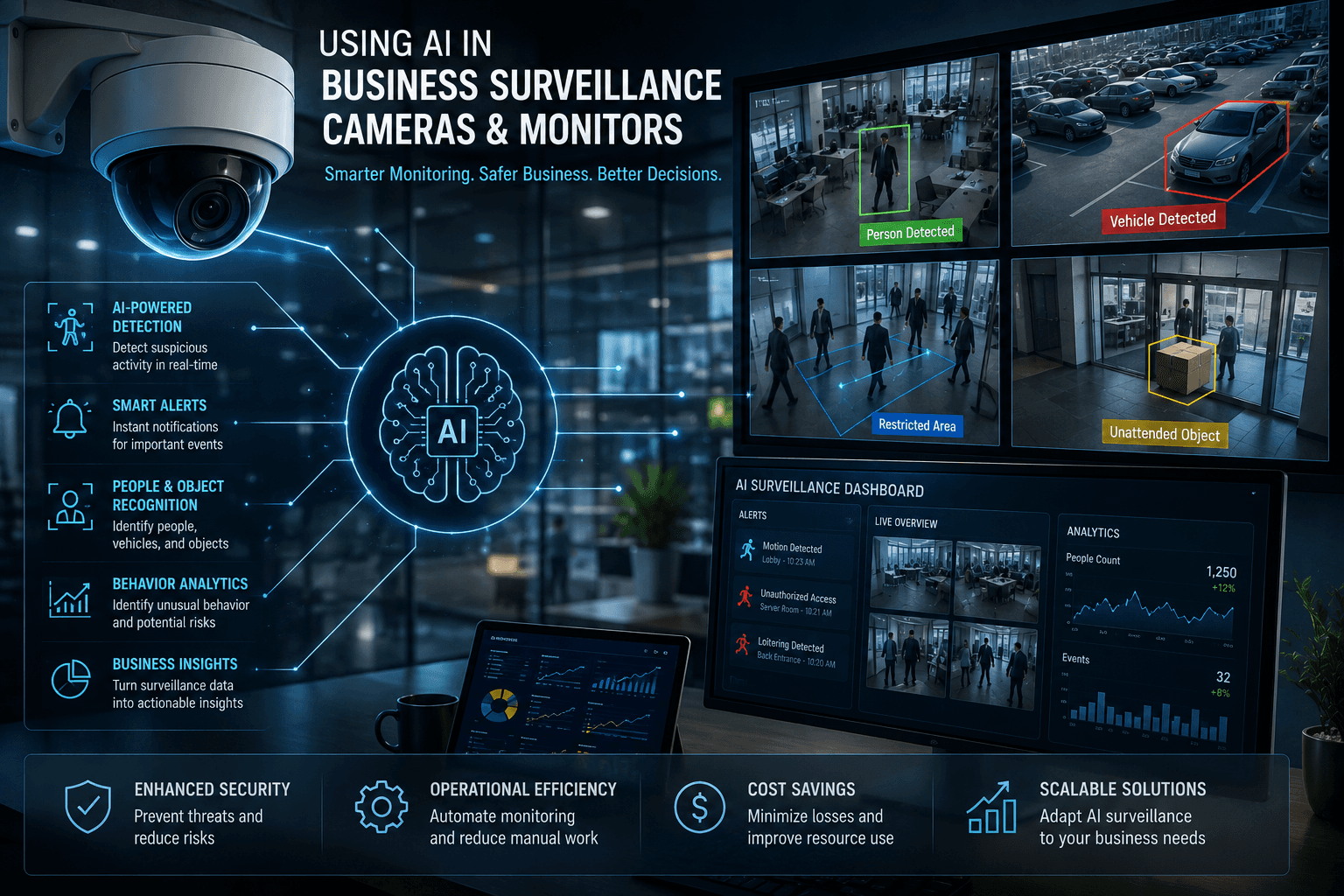
Modern AI-powered surveillance systems don't just record — they understand what they're seeing. They can tell the difference between a person and a shadow. They can count how many customers entered your store between 10am and 2pm. They can alert you the moment a vehicle enters a restricted area after hours. They can identify a known shoplifter the moment they walk through the door.
And increasingly, this technology is not limited to large enterprises with dedicated security teams and six-figure budgets. Accessible, well-supported platforms are bringing genuine AI surveillance capability to small and medium businesses at price points that make serious sense.
This article explains what AI surveillance can actually do, what it genuinely cannot do, how leading platforms compare, what a realistic deployment costs, and the legal considerations Australian businesses need to understand before they implement.
What AI Surveillance Actually Means
The term "AI surveillance" gets used loosely, so it's worth being precise about what the technology involves and what differentiates it from conventional camera systems.
Traditional surveillance systems record video and rely entirely on a human reviewing that footage — either in real time or after an event. The camera is passive. It sees everything but understands nothing.
AI surveillance systems apply machine learning and computer vision algorithms to the video stream — either in the camera itself (edge AI), on a local server (on-premise AI), or in the cloud — to analyse what the camera is seeing and generate meaningful outputs: alerts, counts, classifications, and identifications.
The practical difference is significant. Instead of a human watching eight screens and hoping to notice something important, the system watches everything simultaneously, never blinks, never gets fatigued, and flags only what matters.
What AI Surveillance Can Do
People and Object Detection
The most fundamental AI capability — distinguishing people and vehicles from background movement like trees, rain, or shadows. This dramatically reduces false alarm rates compared to traditional motion detection, which triggers on almost anything.
Modern systems can differentiate between a person, a vehicle, an animal, and general motion — and alert only on the object types you specify. A camera covering a car park after hours can be configured to alert on vehicles but ignore a possum walking through frame.
Intrusion Detection and Perimeter Monitoring
Virtual perimeter lines can be drawn across camera feeds. When a person or vehicle crosses a defined line or enters a defined zone — a restricted area, a storage room, a server room, a construction site after hours — an alert is triggered immediately.
Surveillance Station's intrusion detection allows businesses to spot trespassers — people or vehicles — within set perimeters and alert security personnel of unauthorised access automatically.
This replaces what would otherwise require either a physical guard or constant human monitoring of feeds.
People Counting and Occupancy Monitoring
AI systems can accurately count the number of people entering and exiting a premises or defined area, maintaining a real-time tally of occupancy.
People counting can be used to calculate visitor numbers as well as total building occupancy. When too many people congregate in a defined area, congestion alerts can notify workers on site.
For retail businesses, this data is genuinely valuable beyond security — understanding peak traffic periods, measuring the impact of promotional activity on foot traffic, and optimising staff rostering based on actual customer volumes rather than guesswork.
Facial Recognition
AI surveillance systems can match faces captured on camera against a database of known individuals. This has legitimate and practical applications in business:
Identifying known shoplifters or individuals previously banned from premises
Granting access to staff in restricted areas without key cards or PINs
Flagging unauthorised individuals entering sensitive areas
Building visitor logs for controlled-access facilities
Facial recognition lets businesses build a database of visitors and employees, and automatically identify visitors who require special attention or non-staff entering restricted areas.
This capability comes with significant legal and ethical considerations in Australia, which are covered in the compliance section below.
Licence Plate Recognition (LPR)
AI cameras and systems can read and log vehicle number plates, matching them against allowed or flagged lists. Use cases include:
Automatically logging all vehicles entering a car park or secure facility
Alerting when an unauthorised vehicle enters staff-only parking
Flagging vehicles associated with previous incidents
Automating entry to gated facilities without a boom gate operator
Licence plate recognition can notify owners when vehicles that do not belong to members or employees enter a parking lot.
Behaviour and Anomaly Detection
More advanced systems can detect unusual behaviour patterns — loitering in a particular area for an extended period, someone moving against normal traffic flow, objects left unattended, or falls in healthcare or aged care settings.
These systems are trained on what "normal" looks like for a given environment and flag deviations — making them particularly useful in environments where specific behavioural risks exist.
Business Intelligence and Analytics
This is where AI surveillance moves beyond security into genuine business intelligence. People counting data generates foot traffic reports. Heatmaps show which areas of a retail floor receive the most and least attention. Queue length monitoring identifies service bottlenecks. Staff movement patterns reveal operational inefficiencies.
For a retail, hospitality, or service business, this data has direct commercial value separate from any security function.
What AI Surveillance Cannot Do
Being honest about limitations is as important as understanding capabilities.
It is not infallible. AI detection systems have accuracy rates, not perfect accuracy. Facial recognition performance degrades with poor lighting, unusual angles, low resolution cameras, or significant changes in appearance. Overexposed or underexposed facial images can impede AI recognition, and weather conditions, rain, snow, changes in shadows, or differences between day and night can have an impact on detection. Any system claiming 100% accuracy should be treated with scepticism.
It cannot replace human judgement. AI systems identify and alert — a human still needs to respond, assess context, and make decisions. An alert that someone is in a restricted area after hours still requires a person to determine what that means and what to do about it.
It is not a substitute for physical security. Cameras — AI or otherwise — are a detection and deterrent tool, not a prevention tool. They record what happens and can alert in real time, but they do not physically stop anything.
It cannot reliably identify emotion or intent. Despite marketing claims from some vendors, AI systems cannot reliably determine whether someone is angry, anxious, or about to commit a crime based on appearance or expression. These capabilities remain unreliable and are the subject of significant ethical concern.
It generates data that requires management. AI surveillance produces significant volumes of alerts, logs, and footage. Without clear processes for who reviews alerts, how footage is stored, how long it is retained, and how data is accessed, the volume of information can become unmanageable rather than useful.
Cloud-based systems require reliable internet. Systems that process or store footage in the cloud are dependent on a stable, high-bandwidth internet connection. For businesses in areas with variable connectivity — including some parts of regional Queensland — this is a genuine constraint.
Platform Overview: From SMB to Enterprise
The surveillance platform market broadly divides into three tiers: SMB-accessible on-premise systems, mid-market Video Management Software (VMS), and enterprise-grade platforms. Here is an overview of the leading options at each level.
Synology Surveillance Station (DVA Series)
Synology is best known for its NAS (Network Attached Storage) devices, but its DVA (Deep Learning Video Analytics) series brings genuine on-premise AI surveillance to small and medium businesses at accessible price points.
The DVA series runs Synology's Surveillance Station software with AI analytics processed locally on the device — meaning footage and data stay on your premises, not in the cloud.
AI capabilities include:
Facial recognition with staff and visitor databases
People and vehicle detection with perimeter alerts
People counting and occupancy monitoring with reporting
Licence plate recognition
Intrusion detection with configurable alert zones
Congestion detection
Face recognition, people and vehicle detection, occupancy monitoring, and intrusion detection are integrated with Synology's Centralized Management System, allowing businesses to deploy and manage multiple DVA devices from a single host.
Key hardware models:
The DVA1622 is a two-bay NVR designed for small businesses and homes, supporting up to 16 cameras with two simultaneous AI analytics tasks running locally. It includes HDMI output for direct monitoring without a separate computer.
The DVA3221 is a four-bay NVR for small to medium business deployments, supporting up to 12 simultaneous deep learning analytics tasks — significantly more AI processing capacity for larger or more complex deployments.
Camera licences: Synology NAS devices include a small number of free camera licences (typically 2), with additional licences purchased per camera. Per-camera pricing for standalone licences sits in the $32–$60 USD range, with multi-pack discounts yielding a lower average per unit.
Who it suits: Small businesses wanting on-premise AI analytics without cloud dependency, with the technical confidence to manage a NAS-based system internally or with IT support.
Milestone XProtect
Milestone is a Danish company producing one of the most widely deployed Video Management Software platforms globally. XProtect is an open-platform VMS — meaning it works with cameras from over 150 manufacturers rather than requiring proprietary hardware.
XProtect supports over 10,000 cameras and devices from more than 150 manufacturers, provides centralised management controlling unlimited cameras across multiple sites from a single interface, and offers a customisable rules engine enabling sophisticated automated responses based on complex conditional triggers.
AI analytics in Milestone are delivered through third-party integrations rather than natively — meaning you select an analytics provider that plugs into XProtect. This is flexible but adds complexity and cost.
Who it suits: Multi-site businesses, organisations with existing camera infrastructure they want to keep, and deployments requiring significant customisation. Requires technical expertise to implement and manage.
Avigilon (Motorola Solutions)
Avigilon operates in two modes: Avigilon Unity for on-premise and hybrid deployments, and Avigilon Alta for cloud-managed surveillance. Both leverage Motorola Solutions' AI analytics.
Appearance search and unusual motion detection are genuinely useful investigative features, particularly for retail loss prevention and campus security where identifying a specific person across camera feeds matters more than raw alert volume.
Avigilon's AI is tightly integrated with its own hardware — the system works best, and often exclusively, with Avigilon cameras.
Who it suits: Medium to large businesses, retail chains with loss prevention requirements, and organisations where video quality and AI accuracy are the primary criteria and hardware lock-in is acceptable.
Genetec Security Center
Genetec is an enterprise-grade unified security platform that combines video surveillance, access control, and licence plate recognition in a single system.
Genetec is best suited to high-security, large-scale deployments but is complex to implement and expensive. Deployments typically require significant professional services involvement and internal expertise.
Who it suits: Larger enterprises, government, education, and healthcare organisations with complex security requirements, dedicated IT/security teams, and the budget to match.
Eagle Eye Networks
Eagle Eye is a cloud-native Video Surveillance as a Service (VSaaS) platform — no on-premise server required. Cameras connect directly to the cloud for storage, management, and AI analytics.
Eagle Eye is more flexible than many cloud competitors, supporting third-party cameras and making it better suited to franchise or SMB use cases.
The trade-off is ongoing subscription cost per camera per month, which over time can exceed the cost of an on-premise system.
Who it suits: Multi-site businesses prioritising remote management, businesses without on-site IT infrastructure, and organisations comfortable with ongoing subscription costs in exchange for simplicity.
Product and Pricing Comparison Table
Pricing below is indicative in AUD based on publicly available information and typical market rates as of 2025. Enterprise platforms (Avigilon, Genetec, Milestone) require quotes; ranges reflect typical SMB-scale deployments based on available industry data.
Platform | Type | AI Features | Camera Licence Cost | Hardware / Setup Cost | Ongoing Cost | Best For |
|---|---|---|---|---|---|---|
Synology DVA1622 | On-premise NVR | Face recognition, people/vehicle detection, people counting, LPR, intrusion detection | ~$55–$80 AUD per camera (after 2 free) | DVA1622 unit ~$800–$1,100 AUD + drives + cameras | Minimal — no subscription | Small business, 4–16 cameras, on-premise |
Synology DVA3221 | On-premise NVR | Same as DVA1622 + up to 12 simultaneous AI tasks | ~$55–$80 AUD per camera | DVA3221 unit ~$1,400–$1,800 AUD + drives + cameras | Minimal — no subscription | SMB, 8–40 cameras, heavier AI workloads |
Milestone XProtect | On-premise VMS | Via third-party analytics plugins | Quote required — tiered by edition | Server hardware + software licence — from ~$500 AUD for Express+ | Annual support/maintenance fees | Multi-site, camera-agnostic deployments |
Avigilon Unity/Alta | On-premise / Cloud hybrid | Native AI — appearance search, unusual motion, analytics | Quote required | Avigilon cameras + server or cloud setup | Subscription or one-off depending on tier | Medium–large businesses, retail loss prevention |
Genetec Security Center | On-premise / Hybrid | Advanced unified analytics — video, access, LPR | Quote required | Significant — enterprise professional services | Annual licence + maintenance | Enterprise, government, education |
Eagle Eye Networks | Cloud (VSaaS) | Motion detection, object classification, cloud AI analytics | ~$15–$35 AUD per camera/month subscription | Camera hardware only — no NVR/server | Ongoing per-camera subscription | Multi-site SMB, no on-premise IT infrastructure |
Hikvision AcuSense | On-premise / Hybrid | On-device human/vehicle detection, natural language search, deep learning NVR | Camera-integrated — no separate licence for basic AI | Competitive hardware pricing — 4K cameras from ~$150–$400 AUD | Minimal on-premise; Hik-Connect cloud is add-on | Cost-focused deployments, non-regulated industries |
Example Deployment Cost: Small Business, 8 Cameras
To make pricing concrete, here is a realistic cost breakdown for a small retail or commercial business deploying an 8-camera AI surveillance system using Synology's DVA3221 as the platform.
Hardware
Synology DVA3221 NVR (4-bay): ~$1,600 AUD
2 x 4TB surveillance-grade hard drives: ~$300 AUD
8 x IP PoE cameras (mid-range, 4MP): ~$150–$250 AUD each = $1,200–$2,000 AUD
PoE network switch (8-port): ~$150–$250 AUD
Cabling and installation: ~$800–$1,500 AUD depending on site complexity
Licences
DVA3221 includes 2 free camera licences
6 additional camera licences at ~$65 AUD each = ~$390 AUD
Total hardware and licence cost: approximately $4,440–$6,040 AUD
Ongoing costs
No monthly subscription fees for on-premise Synology deployment
Hard drive replacement every 3–5 years: ~$150 AUD per drive
Optional cloud backup via Synology C2 Backup for Surveillance: ~$10–$30 AUD/month depending on storage
Professional configuration and setup: ~$500–$1,500 AUD depending on site complexity and IT provider.
Comparable Eagle Eye Networks cloud deployment (8 cameras):
Camera hardware: ~$1,200–$2,000 AUD (cameras only, no NVR)
Monthly subscription: ~$15–$35 per camera = $120–$280 AUD/month
Annual cost: ~$1,440–$3,360 AUD/year ongoing
Over three years, the on-premise Synology deployment is typically less expensive than a comparable cloud subscription — the upfront investment is higher but ongoing costs are minimal. The cloud option suits businesses that prioritise remote management and minimal on-site infrastructure over long-term cost efficiency.
The Australian Legal Framework: What You Must Know Before You Deploy
AI surveillance in Australian workplaces is not a technology decision alone — it is a legal one. The regulatory environment is evolving rapidly, and businesses that deploy AI surveillance without understanding their obligations face genuine legal exposure.
Privacy Law
The Privacy and Other Legislation Amendment Act 2024 applies to all Australian businesses. From 10 June 2025, it created a new statutory tort of serious invasions of privacy, allowing individuals — including employees — to directly sue an organisation that commits a significant privacy breach, including unauthorised surveillance or monitoring.
This means AI surveillance that goes beyond what is proportionate and reasonable — or that is deployed without proper notice and disclosure — can now result in direct legal action by affected individuals, not just regulatory penalties.
Workplace Surveillance Laws
Workplace surveillance is governed by state and territory legislation, which varies. In New South Wales, the Workplace Surveillance Act 2005 applies. Queensland does not have dedicated workplace surveillance legislation, but the Privacy Act and work health and safety obligations apply.
Proposed reforms in Victoria include imposing reasonability and proportionality requirements on workplace surveillance systems and mandating that 14 days written notice is given to employees before any surveillance systems can be implemented. While these reforms are Victorian, they signal the direction of regulation nationally.
As surveillance capabilities become more sophisticated, it is important for employers to ensure their systems remain compliant with evolving state regulations, and that the business benefits of such developing capabilities are balanced with the potential adverse effects on employee wellbeing and goodwill.
What This Means in Practice for Australian SMBs
Before deploying AI surveillance, businesses should:
Establish a clear and legitimate purpose. Security cameras covering entrances, stock areas, cash registers, and public-facing areas for security and theft prevention are well-established and generally accepted. Surveillance that monitors employee productivity, tracks movements throughout a workspace, or collects biometric data requires stronger justification.
Provide written notice to employees. At minimum, employees should be informed in writing that surveillance is in operation, what it captures, how footage is stored, and how it may be used. Many legal advisors recommend this as best practice regardless of which state the business operates in.
Use signage for customer-facing areas. Visible signage that a premises is under camera surveillance is standard practice and manages expectations for customers and visitors.
Be cautious with facial recognition. Facial recognition of employees raises biometric data considerations under Australian privacy law. If you are considering facial recognition for staff access control or monitoring, seek legal advice specific to your jurisdiction before implementing.
Retain footage only as long as necessary. Define and document a retention period for footage — 30 days is common for most business applications — and ensure your system is configured to overwrite or delete footage beyond that period automatically.
Restrict access to footage. Define who can access recorded footage and under what circumstances, and document this in a written policy.
Choosing the Right System for Your Business
The right platform depends on four factors: the size of your deployment, your technical capability, your budget structure preference, and what you actually need the system to do.
For a small business deploying 4–20 cameras and wanting genuine AI analytics without ongoing subscription costs, Synology's DVA series is the standout option at this price point. It runs on your premises, keeps your data local, and delivers facial recognition, people counting, intrusion detection, and LPR without per-camera monthly fees. The trade-off is that it requires some technical capability to set up and manage, and AI analytics are limited to the processing capacity of the DVA unit.
For a business that wants simplicity, remote management, and is comfortable with ongoing costs, a cloud-based VSaaS platform like Eagle Eye Networks removes the on-site infrastructure requirement and makes multi-site management straightforward from a single interface.
For a medium-sized business with more complex requirements — multiple sites, integration with access control, advanced analytics, or a larger camera count — Milestone XProtect or Avigilon are worth evaluating. Both require professional implementation and carry higher costs, but deliver significantly more capability and scalability.
For enterprise deployments, Genetec Security Center is the most comprehensive unified platform available, but it is built for organisations with the budget, infrastructure, and internal expertise to support it.
The Practical Bottom Line
AI surveillance is no longer out of reach for Australian SMBs. What was enterprise technology five years ago is available today at small business price points — with meaningful capabilities that go well beyond recording footage.
The businesses that benefit most from this technology are those that deploy it with a clear purpose, configure it properly, understand what it can and cannot do, and operate it within Australia's evolving legal framework. The ones that struggle are those that buy on feature lists without thinking through the operational reality — who manages alerts, who reviews footage, what the retention policy is, and what the system is genuinely there to do.
Done properly, AI surveillance delivers genuine value: faster incident response, reduced theft, better operational intelligence, and the kind of consistent monitoring that a human simply cannot maintain across multiple cameras over extended periods.
The technology is ready. The question is whether the deployment is.
This article is provided for general information purposes. Legal and compliance requirements for workplace surveillance vary by state and territory in Australia and are subject to ongoing legislative change. Seek qualified legal advice before implementing AI surveillance systems in your business.